
Quick answer: put your files in one folder, compress it to a ZIP, and attach that single file â a two-minute job on any computer. A ZIP gets most document batches under the 25 MB Gmail limit and 20 MB Outlook limit. The honest catch: photos, videos and PDFs barely shrink when zipped, because they’re already compressed. Documents and spreadsheets shrink a lot.
That catch is the part most guides skip, and it’s the reason people zip a folder of photos and wonder why it’s still too big. This guide covers the 2-minute zip workflow, which file types actually compress, and three honest options when the ZIP still won’t fit.
Attachment limits by service
Every email service caps attachment size, and the cap applies to the total message â attachments plus the encoded overhead (email systems add roughly a third when encoding files for transport, so a “20 MB limit” realistically means files summing to about 15 MB):
| Service | Stated limit | Practical file budget |
|---|---|---|
| Gmail | 25 MB | ~18 MB of files |
| Outlook / Microsoft 365 | 20 MB (default) | ~15 MB of files |
| Yahoo Mail | 25 MB | ~18 MB of files |
| Corporate Exchange | Often 10â35 MB, set by IT | Ask, or stay under 10 MB |
If your recipient runs corporate Exchange, the safest habit is keeping the ZIP under 10 MB â their IT team’s limit is invisible to you and bouncebacks waste a day.
The 2-minute zip workflow
Both operating systems zip for free, and a browser-based tool does it without touching the file system at all â handy on a locked-down work computer:
On Windows
- Put all the files in one folder.
- Right-click the folder and choose Compress to ZIP file (Windows 11) or Send to â Compressed (zipped) folder (Windows 10).
- A ZIP appears with the same name â rename it to something the recipient will recognize, like Invoices-March.zip.
On Mac
- Select the files or folder in Finder.
- Right-click and choose Compress.
- Rename Archive.zip to something meaningful.
In the browser (any device, no installs)
- Open the free Create ZIP tool.
- Drag in your files â documents, images, PDFs, mixed batches are fine.
- Download the ZIP and attach it to your email. Everything runs locally in your browser; the files never leave your device.
The browser route also sidesteps a real annoyance: some corporate machines restrict right-click compression tools, but the browser works everywhere.
What actually shrinks (and what doesn’t)
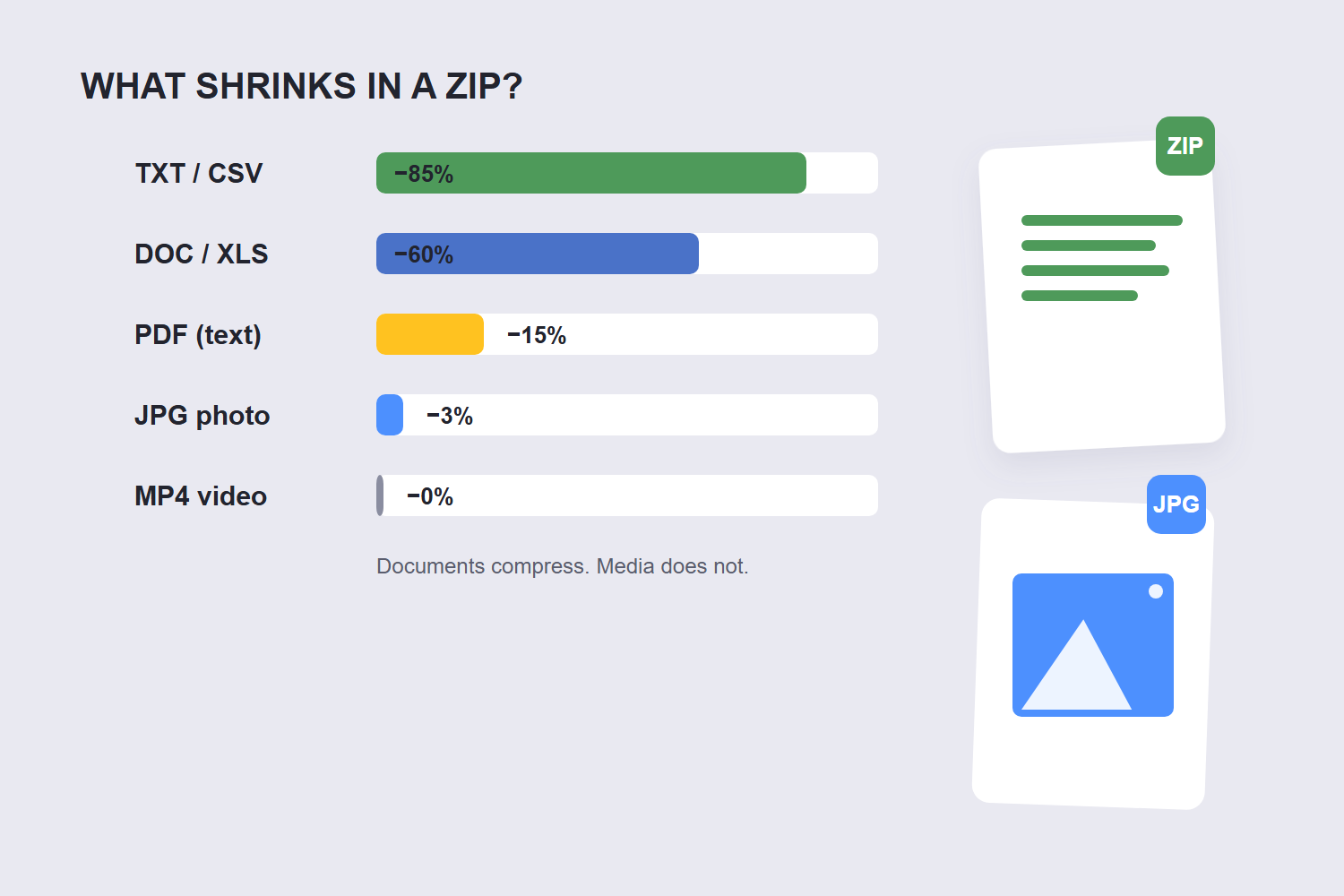
ZIP compression works by finding repeated patterns in file data. Text has lots of repetition; compressed media has none left to find. That’s the whole story:
| File type | Shrinks in a ZIP? | Why |
|---|---|---|
| Word, Excel, PowerPoint (older .doc/.xls) | Yes, often 50â80% | Text and XML compress extremely well |
| CSV, TXT, logs | Yes, often 70â90% | Pure repetitive text |
| Modern .docx/.xlsx (already zipped internally) | Barely, ~5% | They ARE zip files already |
| JPG, WebP photos | Barely, ~1â5% | Already lossy-compressed |
| MP4 video, MP3 audio | Practically not at all | Video/audio codecs fill the data |
| 0â20% depending on content | Text-heavy PDFs shrink some; image-heavy don’t |
This is why the honest first question isn’t “how do I zip bigger” â it’s “am I zipping the right file types.” A folder of ten Word documents zips down beautifully. A folder of ten iPhone photos was never going to shrink.
When the ZIP is still too big: 3 options
Option 1: shrink the files before zipping. This is the lever people forget. Photos straight off a phone are 3â5 MB each at full resolution â for email, they don’t need to be. Resizing to display dimensions first cuts an album to a fraction of its size, and quality stays fine on any screen. The same goes for PDFs: compressing before zipping turns a 30 MB scan into a few MB. Our image compression guide has the measured quality numbers.
Option 2: send a cloud link instead of an attachment. Gmail does this automatically when you attach via Drive â the “attachment” becomes a link and the size limit disappears. For professional contexts, a shared folder link is cleaner anyway: recipients always get the latest version, and nobody’s inbox chokes.
Option 3: split the archive. Tools like 7-Zip can split a ZIP into fixed-size parts (say 15 MB each) that you send across several emails. The recipient extracts them together. It works, but it’s the least friendly option â use it only when the recipient genuinely needs the exact original files and a link won’t do.
My honest ranking for most situations: resize/compress first, zip second, cloud link if it’s still too big. Splitting archives is a last resort â it’s the option most likely to confuse the person receiving.
FAQ
How do I zip multiple files into one file?
Put the files in a folder, right-click it and choose Compress (Windows: “Compress to ZIP file”, Mac: “Compress”). Or use the browser-based Create ZIP tool: add your files, download one ZIP. Both take about two minutes.
What is the email attachment size limit?
Gmail allows 25 MB per message, Outlook 20 MB by default, and Yahoo 25 MB â but encoding overhead means your actual file budget is roughly 70â75% of those numbers. Corporate Exchange servers often cap lower, set by IT. Microsoft’s own guidance recommends compressing files to fit under Outlook’s attachment limits.
Why didn’t my ZIP get smaller?
Almost certainly because it contains already-compressed files: JPG photos, MP4 videos, PDFs. ZIP compression only shrinks files with repetitive data â text, spreadsheets, raw documents. Media files are already compressed inside their formats.
Can the recipient open a ZIP without special software?
Yes â Windows, Mac, Android and iOS all open ZIP files natively with a double-tap or right-click. No extra software is needed on either end, which is why ZIP remains the safest format to send.
How much does zipping reduce file size?
It depends entirely on content: text documents often shrink 50â90%, office files 5â50%, and photos/videos typically 1â5%. Test once and you’ll know your batch â or resize and compress the media files first, which is where the real savings are.
Is a ZIP file safe to email?
ZIP itself is just a container â the safety depends on the contents. One caveat: some corporate mail servers strip or quarantine ZIP attachments as a security policy. If your recipient works somewhere strict, ask first or send a cloud link instead.
